


We have added interactive integration demos to the CryptoSwift developer portal, giving you a hands-on way to explore common integration flows before writing any code.
Choose a scenario, change its configuration, step through the customer experience, and follow the corresponding API requests, widget events and webhooks alongside it.
Our integration guides and compliance workflows still contain the implementation details. The demos are there to give you the bigger picture first.
Who has time to read documentation? Kidding. We spent quite some time writing it. But sometimes clicking through a flow is simply the fastest way to understand how all the pieces fit together.
Interactive integration demos: three panels, one connected flow
The demo page is split into three connected panels.
On the left, you choose a scenario and configure the situation you want to explore. In the middle, you go through the flow in Demo Bank, a sample application representing your own product. On the right, you can inspect the API calls, widget events and webhook notifications triggered along the way.
When a flow involves your compliance or operations team, you can switch between the customer application and a simplified admin dashboard. Both views follow the same case, letting you trace the journey from customer action to operational review and backend processing.
The sequence panel includes requests and responses with code examples you can inspect and copy. Links to the relevant guides are available when you want to go deeper into the implementation details.
The demos currently cover Smart Withdrawal, Travel Rule messaging, wallet verification and Wallet Intelligence (KYW). You can explore each building block separately or see how they connect in a complete withdrawal journey.
Change the settings and run the flow again to try a different outcome. Counterparty responses and blockchain transfers are simulated, so you can explore the experience without configuring credentials or moving funds.
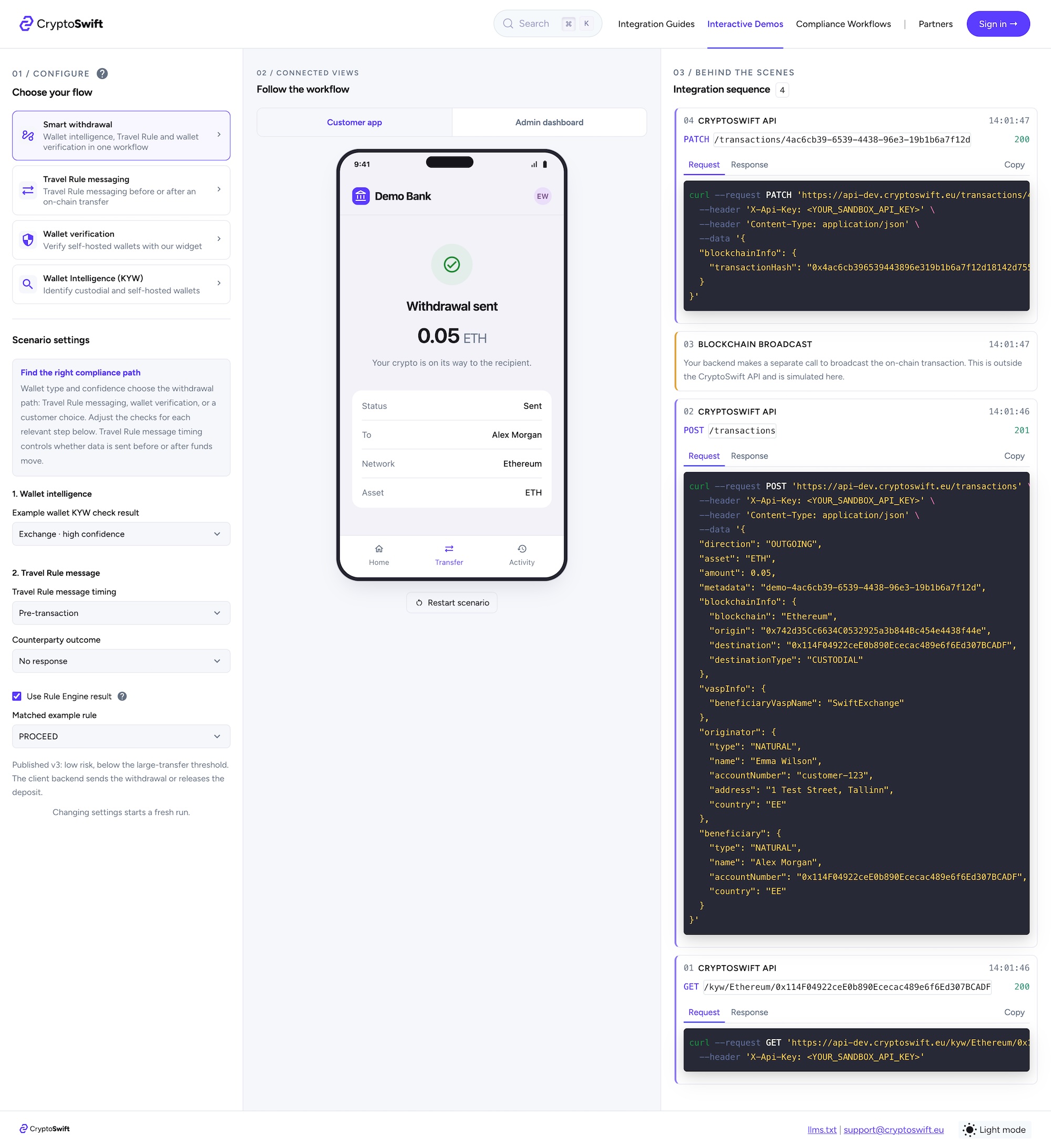
See how the pieces come together
The Smart Withdrawal flow shows what these interactive integration demos are especially useful for: combining several CryptoSwift capabilities into one realistic customer journey.
Your customer wants to withdraw funds. They enter the recipient name, destination wallet, amount and asset. But what happens next depends on the wallet they are sending to.
First, CryptoSwift can run a Wallet Intelligence (KYW) check to determine whether the destination is custodial or self-hosted. If it is custodial, the flow continues with a Travel Rule message to the receiving VASP. If it is self-hosted, you can instead start self-hosted wallet verification when required by your policy or transaction threshold.
And you can take the scenario further. What if KYW cannot determine the wallet type with enough confidence? You can ask the customer for more information and continue from there. Need to identify the VASP? VASP search is available as part of the flow. What if the wallet belongs to a third party rather than the customer? You can explore that path too.
The point is not to prescribe one withdrawal process. Different businesses have different policies, risk thresholds and customer journeys. The demo lets you explore the scenarios that are relevant to you, see the resulting API calls and events, and understand how individual CryptoSwift building blocks can be combined into one complete flow.
Good building blocks need good documentation
For us, providing an API is only part of the job. We also want to make it clear how the pieces fit together: what happens in your application, what your backend needs to handle, and where compliance or operations teams become involved.
A field description or request example is useful. So is a workflow guide. An interactive example adds another way to understand the same process, especially when several services, systems and teams are involved.
Different teams also look at the same integration from different perspectives. An engineer may want to inspect requests, responses and events. A product person may want to understand the customer journey. A compliance team may want to see where their decisions and review steps fit into the process.
The demos put those perspectives into one shared flow. It is much easier to discuss an integration when everyone can follow the same case and see how their part connects to the rest.
Even complicated things should be easy to understand
Travel Rule integrations involve several systems, people and decisions. There is enough complexity in the actual work, so understanding how everything fits together should not add more.
We believe even complicated compliance workflows can be explained clearly. That principle shapes how we build the CryptoSwift API, dashboard and developer portal. The interactive integration demos are another part of that approach, giving you a practical way to explore the flows before starting the implementation.
Choose a scenario and try the demos. Configure the flow, run through it, and inspect what happens behind the scenes.
And when you are ready to build, the documentation will still be there.